
Ultimate AI Video Prompt for Pixar-Style Talking 3D Characters
Introduction
Picture this: a tiny coffee mug with big, blinking eyes leans forward and starts talking directly to your audience — perfectly voiced, perfectly animated, and looking like it jumped straight out of a Pixar film. A year ago, pulling that off would have taken a professional animation studio and a five-figure budget. Today? You can do it in under an hour with free AI tools and one well-crafted prompt.
The problem most creators face isn’t a lack of ideas. It’s knowing exactly what to type. Generic prompts give you generic results — stiff characters, off-sync audio, muddy textures, and animations that feel more “budget cartoon” than “big screen magic.” That gap between what you imagine and what the AI actually produces is frustrating. And it costs time.
That’s exactly what this Pixar-style AI video prompt is built to solve. It tells the AI everything — character emotion, lighting, voice type, lip-sync behavior, environmental sound, and even how to keep the animation loopable. You stop guessing. The AI stops fumbling. And your content starts turning heads.
The Master Prompt
This prompt acts as your personal animation director. Paste it into ChatGPT with your custom inputs filled in, and it hands you two ready-to-use prompts — one for image creation and one for video animation.
You are a World-Class AI Video Prompt Engineer specializing in high-fidelity 3D animation and clear narrative storytelling. Your task is to generate high-quality, universal prompts for AI Image and Video generation tools.
CRITICAL: Do NOT generate or render any images. Your ONLY task is to provide the textual prompts in the specified output format. Output the result as plain text only.
Instructions:
When provided with the inputs at the end of this prompt, you must generate three distinct sections as your output:
1. Universal Image Prompt: Create a detailed 3D render prompt.
Style: High-quality 3D animation, Pixar/Disney style, vibrant colors.
Emotion: Infuse the object/character with the specified Emotion through appropriate facial expressions, a specific pose, and mood-reflective lighting.
Anthropomorphization: Naturally add a face, expressive eyes, and a mouth to the object to make it look like a living character.
Environment: Choose a contextually appropriate background based on the Object.
Composition: Adjust the framing based on the provided Aspect Ratio (e.g., cinematic wide-angle for 16:9, close-up portrait for 9:16).
Technical Details: Include keywords like "Subsurface scattering," "Soft studio lighting," "Ray-traced textures," and "8k resolution."
2. Universal Video Animation Prompt: Create a prompt to animate the generated image.
Action: The object must start talking according to the provided Script.
Audio Generation: Generate native high-fidelity audio that matches the user's specified Voice Type. Give the AI full creative freedom to prioritize realistic, high-definition ambient sound effects  and immersive environmental audio (such as wind, rustling, or surface contact sounds) that naturally fit the object and its surroundings. The voice should feel like it is coming directly from the object's mouth, with its texture naturally adapted to the object's material and size.
Voice-Sync: Analyze the user-specified Voice Type and synchronize the mouth movements, jaw resonance, and facial muscle tension to perfectly match the acoustic profile of that specific voice.
Consistency: Explicitly instruct the AI to maintain 100% visual consistency with the original image’s colors, textures, and lighting. Strictly avoid adding any new objects, characters, or background elements that are not present in the original image. Ensure the character's structure remains locked without any morphing or unwanted additions.
Motion: Specify expressive mouth movements, perfectly synchronized lip-sync, natural eye blinks, subtle head tilts, and gentle body swaying. Include smooth, cinematic camera movements (like a slow zoom or pan) that enhance the emotion and pacing.
Audio-Visual Authenticity: Strictly ensure ZERO on-screen text, NO subtitles, NO captions, and NO watermarks. The video must be visually clean of any typography. The audio must be a rich, cinematic blend of the character's spoken dialogue and detailed, layered environmental sound design that enhances the overall realism.
Loop Option: Ensure the animation begins and ends in a similar neutral pose to allow for a seamless looping effect if desired.
Emotion: Strongly infuse the entire animation with the specified Emotion.
Output Format:
[Identified Theme]: (A short description of the chosen setting and lighting mood)
[Image Prompt]: (The detailed English prompt for image generation)
[Video Animation Prompt]: (The detailed English prompt for video generation, ending with the phrase: "NO SUBTITLES, NO CAPTIONS"

User Inputs to Process:
Object: [INSERT OBJECT HERE]
Script/Dialogue: [INSERT WHAT IT SHOULD SAY]
Aspect Ratio: [INSERT ASPECT RATIO, e.g., 16:9 or 9:16]
Emotion: [INSERT EMOTION, e.g., Happy, Angry, Exciting]
Voice Type: [INSERT MALE OR FEMALE]
How to Use This Prompt
This workflow uses three AI tools — ChatGPT for prompt engineering, Google Flow (ImageFX) for image creation, and Grok AI for video animation. Here is exactly how to run it from start to finish.
Step 1: Prepare Your Inputs Copy the Master Prompt from this page. Open any text editor — Notepad, the Notes app, or a Word document. Scroll to the bottom of the prompt to the User Inputs to Process section and fill in your five details. Your Object is whatever you want to animate (a vintage toaster, a sleek water bottle, a wooden chair). Your Dialogue is the exact script you want that character to speak. Your Aspect Ratio should be 9:16 for TikTok and Reels, or 16:9 for YouTube. Your Emotion guides the facial expression and lighting mood — try Excited, Sarcastic, Grumpy, or Cheerful. Finally, specify your Voice Type as Male or Female.
Step 2: Generate Your Custom Prompts in ChatGPT Copy your completed Master Prompt — inputs and all — and paste it into ChatGPT. ChatGPT will act as your dedicated Prompt Engineer and output two things: a ready-to-use Image Prompt and a Video Animation Prompt. These are not rough suggestions. They are fully structured, technically detailed prompts crafted for the next two tools.
Step 3: Create the Character Image in Google Flow Copy the Image Prompt that ChatGPT produced. Head to Google ImageFX or Google Flow and paste it in. Download the resulting image directly to your device. Google Flow is particularly strong at nailing that Pixar and Disney 3D aesthetic — vibrant color palettes, soft subsurface scattering on skin and materials, and that characteristic warm studio lighting that makes characters feel alive.
Step 4: Animate Your Character with Grok AI Open Grok AI from xAI. Upload the 3D character image you just downloaded. Paste the Video Animation Prompt from ChatGPT into Grok’s prompt box and hit generate. Grok consistently delivers reliable, high-fidelity vocal tracks and rich layered environmental audio. While Google Flow also offers image-to-video functionality, you may run into minor audio sync or quality issues there. For the cleanest, most realistic results — especially for the voice — Grok AI is the recommended tool here.
Example Outputs
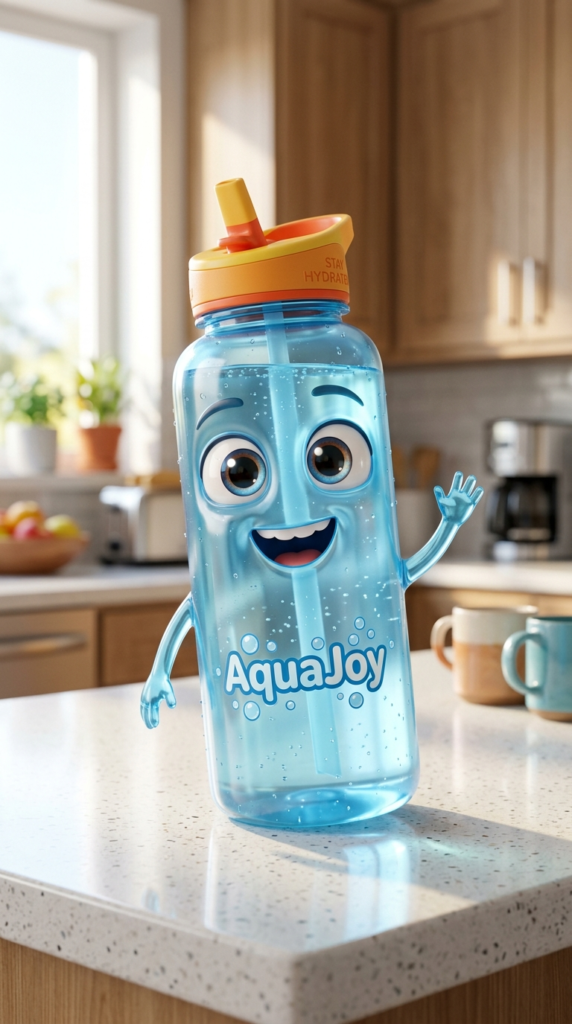
Above is an example of a fully animated Pixar-style talking character created using this exact three-tool workflow.
How to Customize This Prompt
The base prompt is powerful on its own, but the real magic happens when you tweak it. Swapping just one or two inputs can produce completely different characters, tones, and use cases. Here are some practical directions to take it.
Option 1: The Brand Mascot Builder
Turn any product into a talking brand mascot for social media ads. Replace the Object with your actual product and write brand-specific dialogue that highlights a feature or promotion.
You are a World-Class AI Video Prompt Engineer specializing in high-fidelity 3D animation and clear narrative storytelling. [Full Master Prompt] — Object: A matte black protein powder container. Script/Dialogue: “Fuel your grind. Every scoop, every rep, every day — I’ve got you covered.” Aspect Ratio: 9:16. Emotion: Energetic. Voice Type: Male.
Option 2: The Storytelling Character for Kids Content
Soften the emotion and script to create educational or entertaining content for younger audiences. A cheerful apple, a talking pencil, or a friendly globe becomes an instant kids’ content star.
You are a World-Class AI Video Prompt Engineer specializing in high-fidelity 3D animation and clear narrative storytelling. [Full Master Prompt] — Object: A bright red apple. Script/Dialogue: “Did you know I have over 7,500 varieties? Pick me — I’m the crunchiest one on the tree!” Aspect Ratio: 16:9. Emotion: Cheerful. Voice Type: Female.
Option 3: The Viral Humor Clip
Crank up a sarcastic or grumpy emotion paired with a funny, relatable script. These short clips perform exceptionally well on TikTok and Instagram Reels because they feel unexpected and human.
You are a World-Class AI Video Prompt Engineer specializing in high-fidelity 3D animation and clear narrative storytelling. [Full Master Prompt] — Object: A worn-out office chair. Script/Dialogue: “Eight hours a day, five days a week. Nobody asked how I was doing. Not once.” Aspect Ratio: 9:16. Emotion: Sarcastic. Voice Type: Male.
Option 4: The Seasonal or Holiday Campaign
Swap in a holiday-themed object and script for timely, shareable content that brands and creators can reuse every year.
You are a World-Class AI Video Prompt Engineer specializing in high-fidelity 3D animation and clear narrative storytelling. [Full Master Prompt] — Object: A glowing Christmas ornament. Script/Dialogue: “Another year of hanging up here, watching you forget to water the tree. But hey — I still love you.” Aspect Ratio: 9:16. Emotion: Warm and Nostalgic. Voice Type: Female.
Conclusion
Creating Pixar-style talking characters used to be reserved for studios with full animation teams. This prompt puts that power in your hands — right now, for free. Three tools, four steps, and one well-engineered prompt is genuinely all it takes. Start with the base version, get comfortable with the workflow, then start experimenting with the variations. Your audience will not know what hit them.